
Wikipedia Lovers Rejoice!!! 3 awesome tricks to help you learn more!

I discovered three amazing features of Wikipedia that I wanted to share.
We’re going to kill two birds by turning on two AWESOME settings at once.
Step 1
Make a Wikipedia account if you don’t already have one and login.
Step 2
Go to My Preferences
Step 3
Click on Gadgets
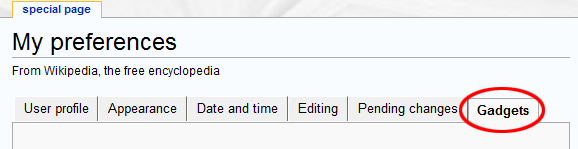
Step 4
Check mark “GoogleTrans” and “Navigation Popups”

Step 5
Scroll down all the way and click “Save.”
Congratulations! Now to explain what you just turned on…
1. Thanks to the “Navigation Popups” gadget you have to turned on, you will now see a little summary of the article by simply hovering over any inline links, similar to what I do on my site, but with much more detail.
For example, hovering over the first word in this article below, proprioception, loads a preview of that article.

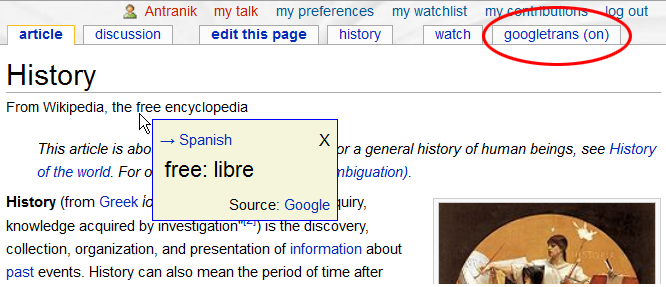
2. The other feature, GoogleTrans, allows you to see the translation of any word by simply pressing the Shift key and hovering over the word.
In this picture below: Hovering over the word “free” while pressing the Shift key provides the Spanish translation. The red-circle on the top right indicates where you go to change the language. This could be an amazing tool for somebody learning a new language!
And last but not least, the third thing I wanted to share…
3. If you hover over the phonetic spelling of a word, you will see a popup that gives an example of what those letters sound like.
For example, if you go to the article about flagellum, you’ll see it says / fləˈdʒɛləm /, which looks really foreign because it is represented by the International Phonetic Alphabet used by linguists based on the Latin alphabet. If you hover over each of those letters in wikipedia (or on my site), you’ll see a tool-tip of what each letter is supposed to sound like.
Well I hope that was helpful. Do you know of any other tips or tricks related to Wikipedia as well?

Let’s Connect
The best way to stay up to date with the latest content and videos is to sign up for my newsletter!