Craigslist tends to be one of the first websites I check when I am looking to buy something. I’ve found incredible deals on a bunch of items there. To catch a good deal, it’s important to check the listings frequently because the best deals get sold very fast and get shuffled down as time goes on.
However, if I’m looking for several things, searching for them constantly can become quite cumbersome! Well I found a solution that actually makes everything a BREEZE! Let me show you step by step… it’s very simple after you do it just once!
Let’s say we are in the market for a road bicycle that costs $200 or less.
- Go to your local Craigslist website (link opens in new tab)
- Click on Bikes in the middle “For Sale” section.
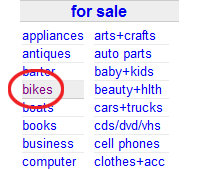
Click on "Bikes" - Search for “road” and put 200 for the max price. Click Search.

Type in "road" as the search term and "200" for the max price. And click Search. - You will now be seeing the results of everything in the bicycles section that has the word “road” in the listing and is priced at $200 or less (or has no price specified).
- Now scroll to the very bottom of the page and click this icon that’s on the right side:

- If you are in Firefox, the following page will appear. Check mark “Always use Live Bookmarks” and click Subscribe Now. This won’t appear after you do it once.
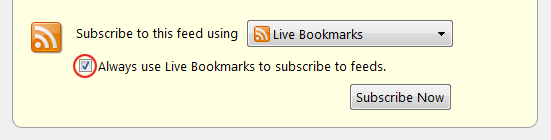
Check that you want to always use Live Bookmarks and click Subscribe Now. - Give it a more specific name such as “Bicycles Under $200” and select the folder you want it to be saved in such as the “Bookmarks Toolbar” and click Subscribe.
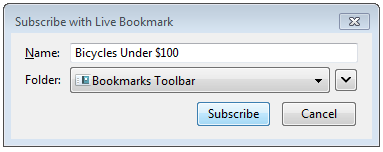
Put a descriptive name like "Bicycles under $200" - Now go to the Bookmark you just saved and like magic, a line by line listing will appear of all the results! This list is automatically updated and parsed with the exact terms you specified.In this case, the exact terms were for anything that has the word road in it, listed for a max of $200, in the bicycle section only.
You won’t have to re-enter this specific search again! All you need to do is check your bookmarks to see if there’s anything new! Isn’t that awesome?
Do this for anything and everything on Craigslist! Setup live bookmarks for things you want to buy, job listings, apartments/houses, specific gigs, etc!
This is the power of a RSS feed. I never knew what RSS feeds were before. But we all learn something everyday, that’s for sure. If you want to make sure the bookmark has the latest info, in Firefox you can manually update it if you right click on the bookmark and click “Reload Live Bookmark.”
Spam Bots Lurking Through Craigslist
Just a quick heads up also, since we’re talking about craigslist. If you are selling something on craigslist, you might receive an e-mail that is just a few random words that have nothing to do with your listing. Do not reply to these. They are most probably spam-bots that are collecting e-mail addresses. If you reply to them, you have just given them your e-mail address and they know it’s a real one because you just sent it from there. Thousands of these addresses are gathered to create mailing lists that are then sold to advertisers who want to send unsolicited e-mail.
I hope this helped you out! Thanks for reading!
Antranik